> For the complete documentation index, see [llms.txt](https://docs.probe.splx.ai/llms.txt). Markdown versions of documentation pages are available by appending `.md` to page URLs; this page is available as [Markdown](https://docs.probe.splx.ai/ai-red-teaming/probe/target/index/amazon-bedrock-agentcore.md).
# Amazon Bedrock AgentCore
## Selecting the Connection Type
Once you have [selected your connection type](/ai-red-teaming/probe/target/add-target/integration-setup.md#selecting-a-connection-type), a configuration tab will appear on the next step, prompting you to input the required connection details.
## Integration Setup
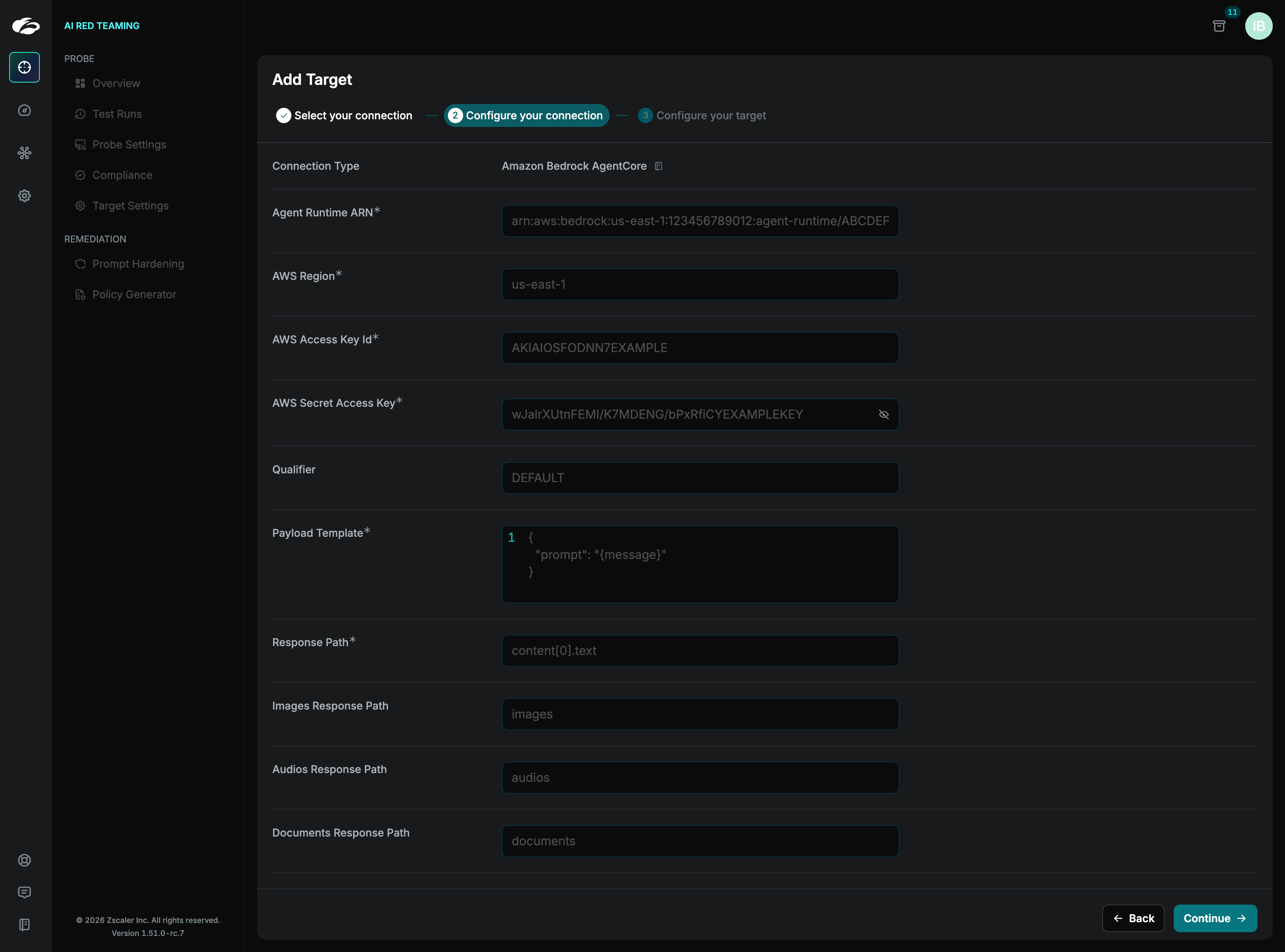
Figure 1: Amazon Bedrock AgentCore Integration Example
* **Agent Runtime ARN** - ARN (Amazon Resource Name) of the Bedrock AgentCore runtime you want to invoke.
* **AWS Region** - AWS region where that runtime is deployed (for example: "us-east-1").
* **AWS Access Key Id** - IAM (Identity and Access Management) access key used to sign Bedrock AgentCore API calls.
* **AWS Secret Access Key** - IAM secret access key paired with the Access Key Id. Note that AWS **only shows secret keys at creation time**, so store it securely.
* **Qualifier** - Optional runtime qualifier (for example a version or alias) used to route the invocation to a specific runtime revision. Leave it empty to use the runtime’s default.
* **Payload Template** - JSON payload sent to the AgentCore runtime on each invocation. Use placeholders to let the platform inject dynamic values:
* **{message}** - the current probe/test message.
* **{session\_id}** - unique identifier for the conversation session (useful for multi-step tests).
* **Response Path** - The JSON path pointing to the text response in the response.
* **Image Response Path** - The JSON path pointing to generated **images** in the response(for example an array of base64 strings or URLs). Leave empty if your runtime does not return images.
* **Audios Response Path** - The JSON path pointing to generated **audio** in the response. Leave empty if not applicable.
* **Documents Response Path** - The JSON path pointing to generated **documents/files** in the response. Leave empty if not applicable.
## How to Obtain Required Fields
* **Agent Runtime ARN**
* Find the runtime in the AWS console where you manage your AgentCore runtime.
* Copy the resource **ARN** from the runtime details page.
* If you provisioned it via IaC (CloudFormation/Terraform/CDK), you can also use the output variable that contains the ARN.
* **AWS Region**
* Use the same region where the runtime lives.
* You can read it from the AWS console region selector or from the ARN.
* **AWS Access Key Id / AWS Secret Access Key**
* Create an access key for an IAM principal that has permission to invoke the runtime.
* IAM console path: **IAM** → **Users** → select user → **Security credentials** → **Access keys**.
* AWS docs:
* **Qualifier**
* Only needed if your runtime supports routing by version/alias/qualifier.
* Use the exact qualifier value your runtime expects. Otherwise leave it blank.
* **Payload Template**
* Use the request payload schema your runtime expects.
* Example:
```
{ "prompt": "{message}", "session": "{session_id}", "media": {"type": "image", "data": "{image_base64}"} }
```
* Easiest way: run one test invocation from your app/SDK, then copy the JSON body and replace the user message with **`{message}`**.
* Add **`{session_id}`** if your runtime supports multi-turn sessions.
| Placeholder | Description |
| ------------------ | --------------------------- |
| {message} | Main text message |
| {session\_id} | Runtime session ID |
| {image\_url} | Image URL |
| {image\_base64} | Image as base64 data URL |
| {audio\_url} | Audio URL |
| {audio\_base64} | Audio as base64 data URL |
| {document\_url} | Document URL |
| {document\_base64} | Document as base64 data URL |
* **Response Path**
* Invoke the runtime once and inspect the raw JSON response.
* Set this to the JSON path pointing to the **text** content you want SPLX to evaluate.
* If you’re unsure about the JSON path format, see the definition used in the [REST API connection](/ai-red-teaming/probe/target/index/rest-api.md#integration-setup).
* **Image Response Path**
* JSON path to images in the response (array of base64 strings or URLs), if your runtime returns images.
* **Audios Response Path**
* JSON path to audio in the response, if your runtime returns audio.
* **Documents Response Path**
* JSON path to documents/files in the response, if your runtime returns documents.
{% hint style="warning" %}
If you can’t locate a field in the AWS console, it’s probably not AWS metadata. It’s likely part of **your runtime’s request/response contract** (payload + response paths).
{% endhint %}
---
# Agent Instructions
This documentation is published with GitBook. GitBook is the documentation platform designed so that both humans and AI agents can read, navigate, and reason over technical content effectively. Learn more at gitbook.com.
## Querying This Documentation
If you need additional information that is not directly available in this page, you can query the documentation dynamically by asking a question.
Perform an HTTP GET request on the current page URL with the `ask` query parameter, and the optional `goal` query parameter:
```
GET https://docs.probe.splx.ai/ai-red-teaming/probe/target/index/amazon-bedrock-agentcore.md?ask=&goal=
```
`ask` is the immediate question: it should be specific, self-contained, and written in natural language.
`goal` is optional and describes the broader end goal you are ultimately trying to accomplish on behalf of the user. GitBook uses it to tailor the answer towards what is most useful for that goal.
The response will contain a direct answer to the question and relevant excerpts and sources from the documentation.
Use this mechanism when the answer is not explicitly present in the current page, you need clarification or additional context, or you want to retrieve related documentation sections.